Jisoo Addicted AI Video Generator
Upload 1 to 2 photos for your ADDICTED duet with a friend or our template actor. JISOO and ROSÉ’s moves, with the original song.
- 1–2 photos
- 15s
- 9:16
- 720p
The original JISOO and ROSÉ ADDICTED duet next to the same 15-second clip made with the iamthememe.com Jisoo Addicted AI video generator, using our own actors.
Add 1 to 2 photos
- JISOO’s part (back left) (optional)Add your first photo to unlock
JPEG, PNG, WEBP · Max 10 MB each
Photo tips and role order
- Photo 1 takes ROSÉ’s part; photo 2 takes JISOO’s part.
- If you add one photo, our own actor dances the other part.
- Use one person per photo, a clear face and a simple background.
- $8.90 per video
- No subscription
- Credits back if no video is made
What is the Jisoo Addicted dance challenge?
The Jisoo Addicted dance challenge comes from JISOO and ROSÉ dancing to JISOO’s song “ADDICTED” in a white hallway with warm ceiling lights and wooden doors. Fans call the pair Chaesoo. The spin, the hand across the lens, the shoulder pose and the side by side finish make the duet recognizable.
ROSÉ shared the hallway dance on TikTok, and JISOO posted the same duet on YouTube Shorts. JISOO’s “Smooth midnight” video is a separate solo dance to the same song. The social clips above show those original posts; this template remakes the hallway duet.
You get the 15 second duet section. It keeps the original song and the 9:16 vertical framing, with a 720p MP4 ready for your phone. You do not need to learn the choreography or record a dance.
For this template, “Jisoo and Rosé ADDICTED dance”, “Chaesoo dance” and “ADDICTED hallway duet” refer to that same two-person performance. The setting and the sequence of gestures identify the clip; the song title alone does not identify which dance video you will make.
Your download is a new cast performing this preset scene, made from your photos. Use the side by side comparison to see exactly which ADDICTED clip you will get.
Make the ADDICTED duet with a friend, or start solo
Photo order sets the parts. The dancers change places during the clip; the labels describe the opening shot.
You and a friend
Add a photo of yourself for ROSÉ’s part, at the front right in the opening shot. Add a consenting friend for JISOO’s part, at the back left in the opening shot. Both original dancers are replaced.
Just you
One photo is enough. You take ROSÉ’s part and our own template actor takes JISOO’s part, so the result still has two dancers.
Try another cast
After downloading, choose Make another and use new photos to cast the duet again. Each new video is its own generation at the same price.
What happens in the 15 second ADDICTED duet?
The hallway dance moves through these scenes in order. Photo 1 takes ROSÉ’s part and photo 2 takes JISOO’s part, even when they turn, cross paths or change sides.
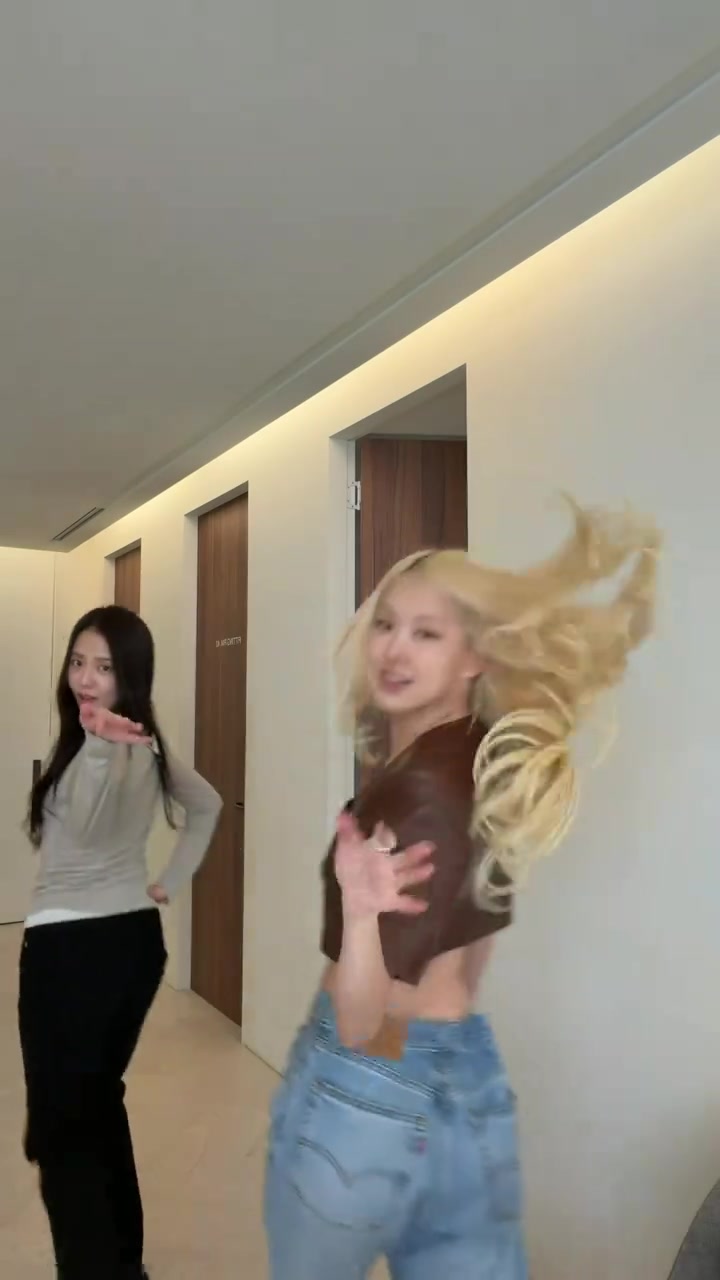
Scene 1
The opening turn
ROSÉ’s part starts at the front right and JISOO’s part is behind on the left. These are the opening positions named on the upload slots. Your first photo takes the nearer dancer’s part.
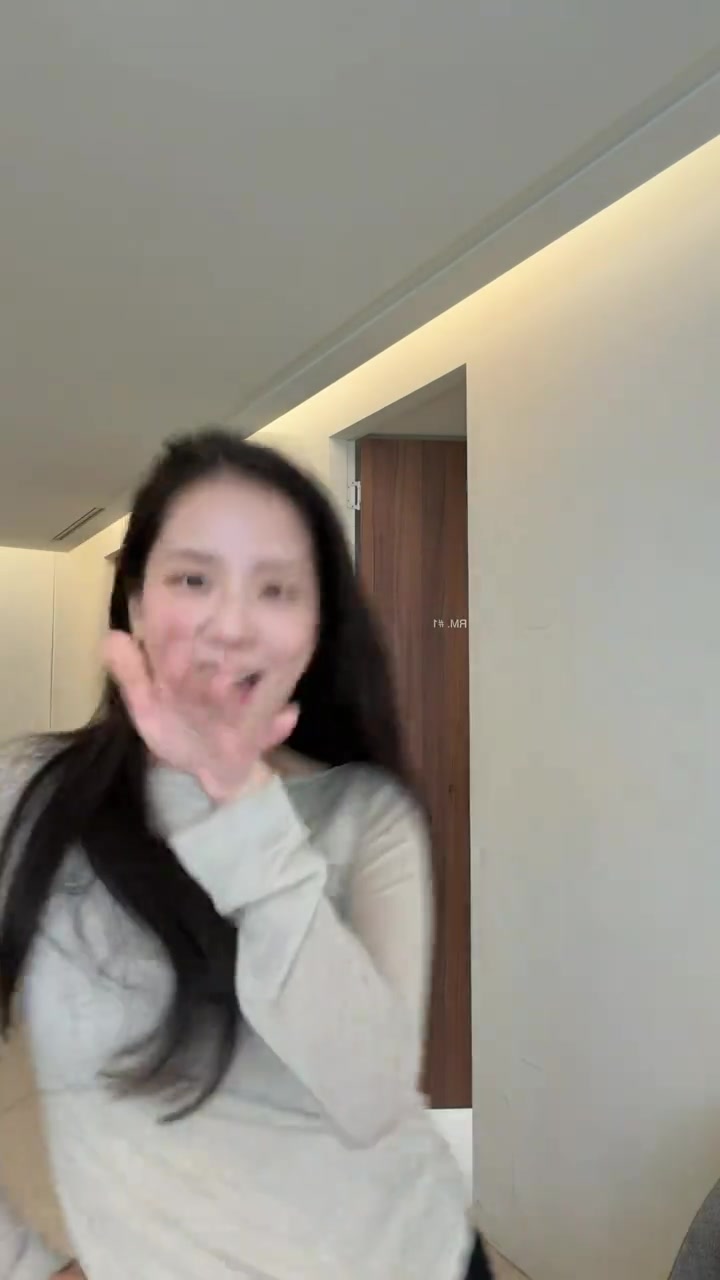
Scene 2
The close-up and lens swipe
The camera cuts to JISOO’s part alone before a hand passes across the lens. This close-up uses your second photo, or our template actor when you upload only one. The brief solo framing is part of the original.
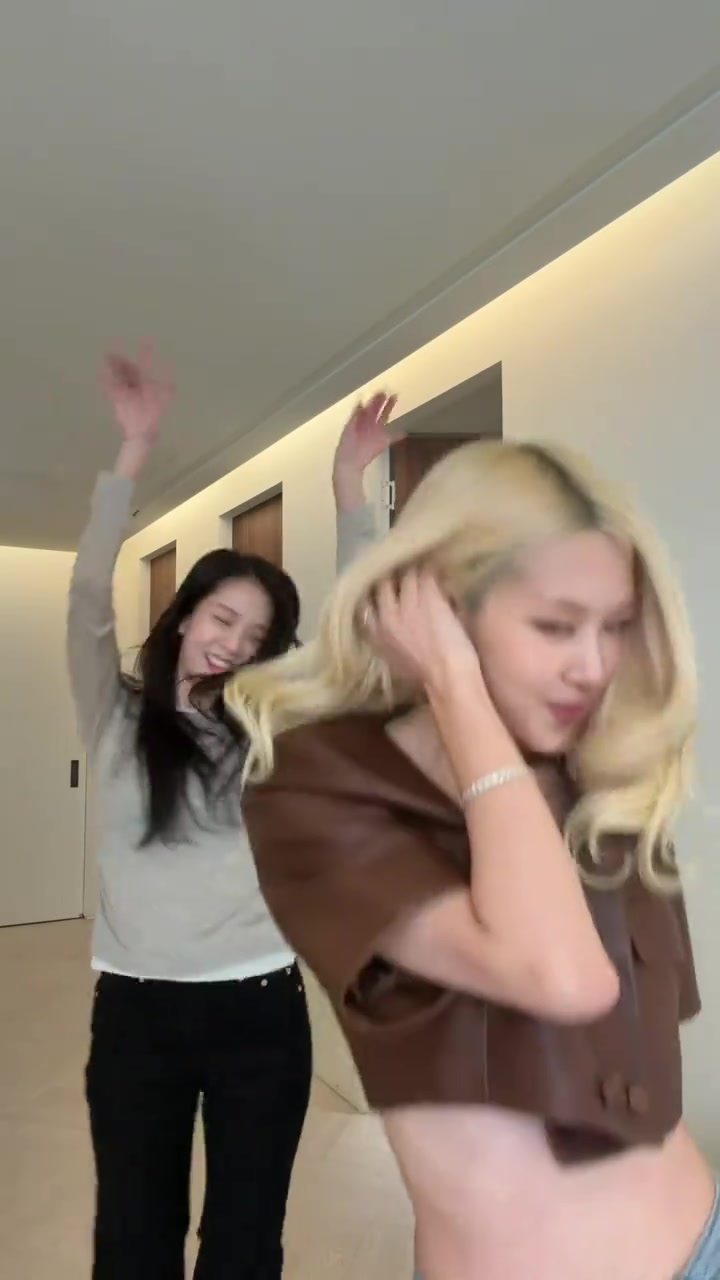
Scene 3
Hands up together
Both dancers return to the hallway shot and bring their hands up. Photo 1 follows the front dancer and photo 2 follows the dancer behind. No extra portrait or reference video is needed for this cut.
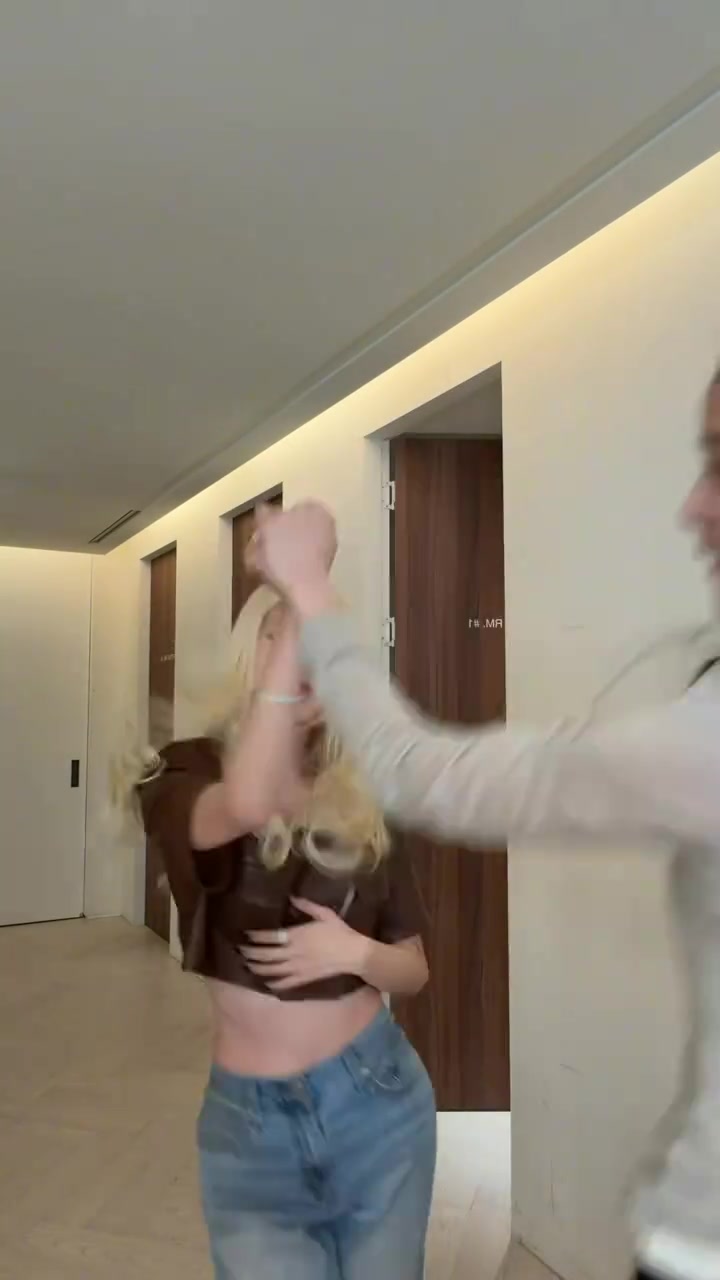
Scene 4
The spin and swap
The dancers spin and cross paths. Your photo order assigns the dance parts, not a permanent side of the screen. Watch this moment in the real sample to see the swap.
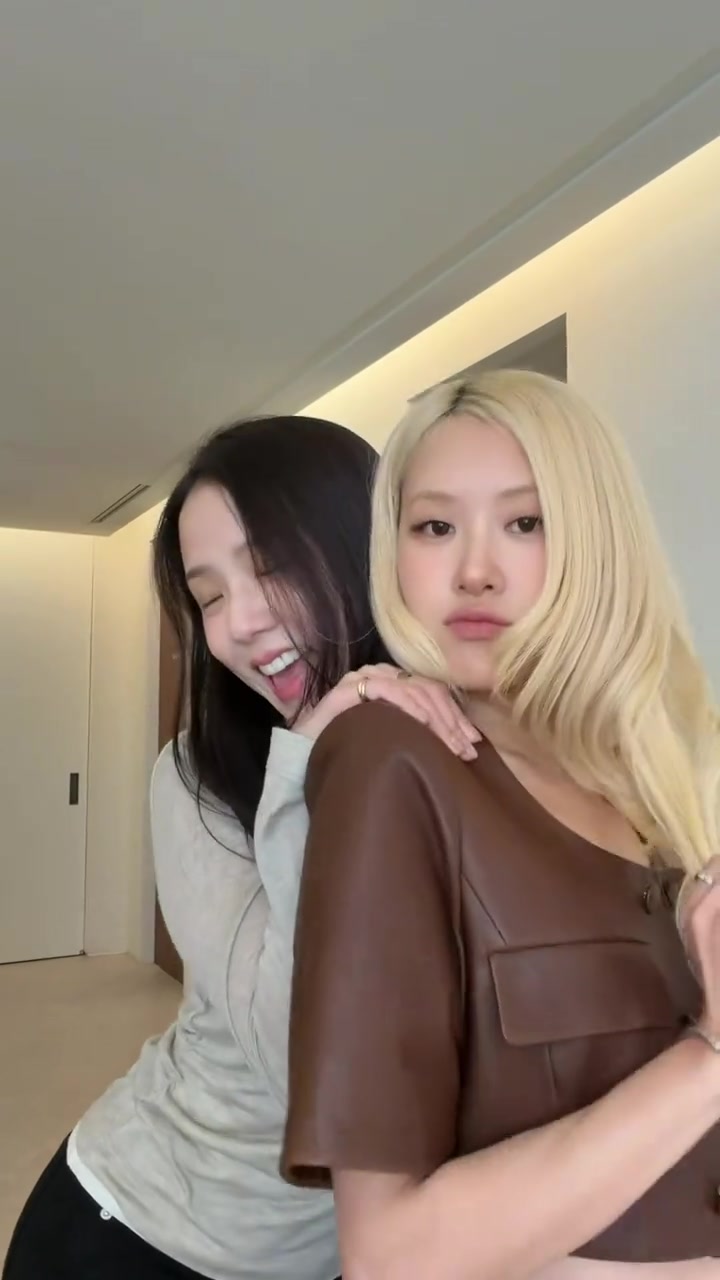
Scene 5
The shoulder pose
JISOO’s part leans in from behind and rests a hand on the other dancer’s shoulder. It is a close two-person pose, so separate, clear portraits help the preset distinguish the two faces.
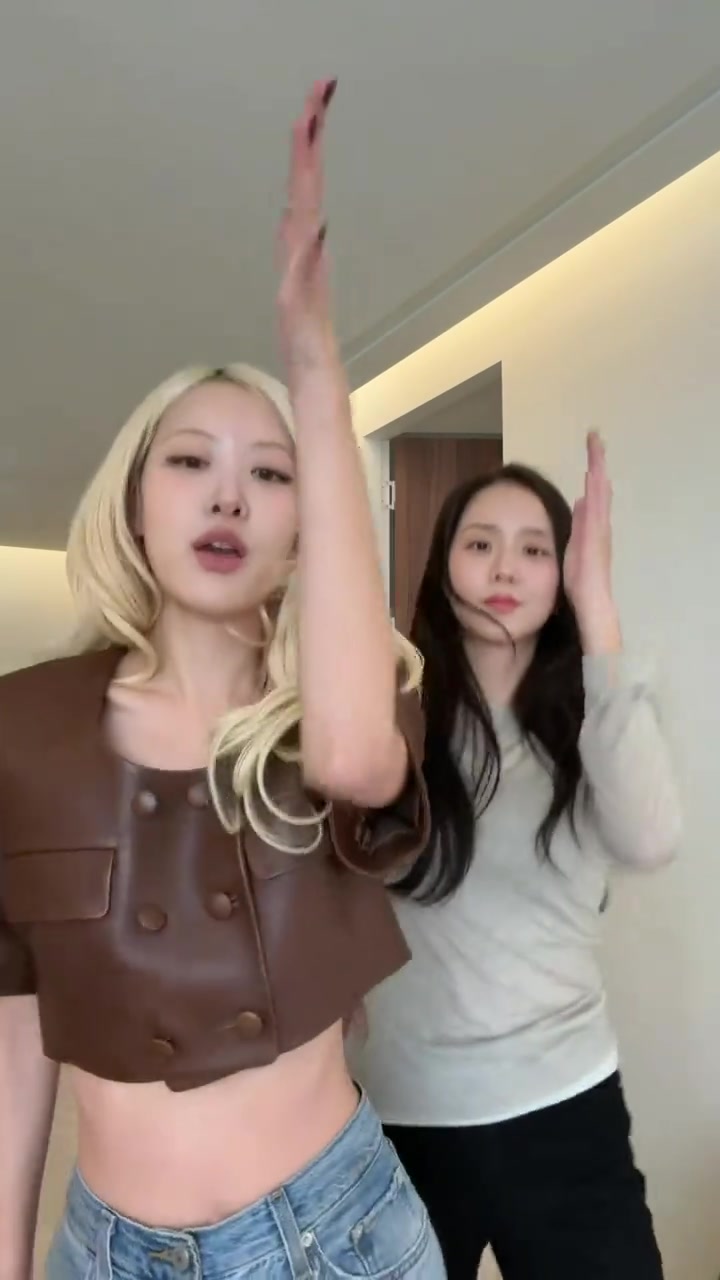
Scene 6
The side by side finish
ROSÉ’s part is now on the left and JISOO’s part is on the right for the final hand gestures. Photo 1 and photo 2 keep those assigned parts through the finish, with the original song timed to the clip.
These frames show the original JISOO and ROSÉ performance. Your remake follows this scene sequence with both original dancers replaced. The real generated example is shown in the comparison.
How to make the Jisoo Addicted AI dance video
- 1
Add 1 to 2 photos
Photo 1 takes ROSÉ’s part; photo 2 takes JISOO’s part.
- 2
Press make
The price is on the button. No prompt to write, no model to pick, no settings.
- 3
Download and post
You get a 15 second 9:16 MP4 at 720p with the original track.
Original vs iamthememe.com
The ADDICTED duet. With your dancers.
Compare the original 15 second duet with our real 720p output. The hallway, camera cuts and original song stay. Both dancers are replaced.
Press play for sound. Your video shows your photos instead of our actors.
- Format
- 9:16 vertical, sized for TikTok, Reels and Shorts
- Length
- 15 seconds
- Resolution
- 720p MP4
- People
- 1 to 2 photos, one person each
- Sound
- The original track, timed to the moves
Original: JISOO and ROSÉ’s ADDICTED duet · 15s · 9:16 · 720p · original song
Stays the same
- The white hallway, the warm ceiling lights and the wooden doors
- The handheld camera, the cuts and the timing of the original clip
- Every move of the duet, from the spin and the swap to the side by side finish
- The original song, in sync with the dance
Becomes yours
- The faces, hair and outfits of the two dancers
- Who dances lead, set by photo order
- With one photo, our own actor dances the other part
How long it takes and where it goes
- Time
- About 5 to 10 minutes. The video is rendered from scratch with you in it.
- Leave anytime
- You can close the page. The video keeps rendering and waits for you in My videos.
- Pick it up
- Watch and download it on this page if you stay, or open My videos later.
- On your phone
- Tap Download video. On iPhone, open it in Files and tap Save Video. On Android, it lands in Downloads.
Pricing
$8.90 per video. No subscription.
- Packs bring it down to $4.99 a video.
- Pay once. Credits never expire.
- If no video is made, your credits come back automatically.
- Within 15 days of buying, we refund the unused part of your pack.